> For the complete documentation index, see [llms.txt](https://docs.ashswap.io/llms.txt). Markdown versions of documentation pages are available by appending `.md` to page URLs; this page is available as [Markdown](https://docs.ashswap.io/ashperp/ashguard-nfts/ashguard-merge-guide.md).
# AshGuard Merge Guide
By merging 2 same-tiered NFTs, you can upgrade your AshGuard to 1-tier higher NFT. This upgrade feature is available at the same time as you mint new NFTs. (Details on the [**benefits of each tier.**](https://blog.ashswap.io/ashguard-nft-collection/))
The merging mechanism is as below:
1. Visit and connect your wallet.
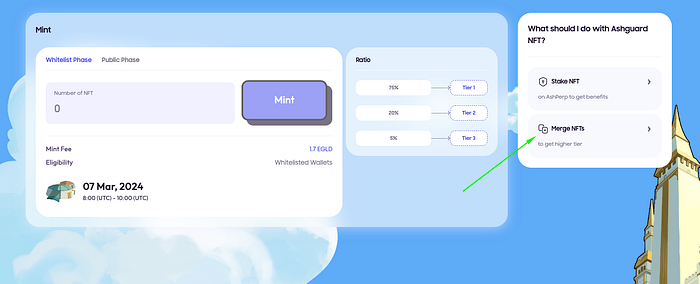
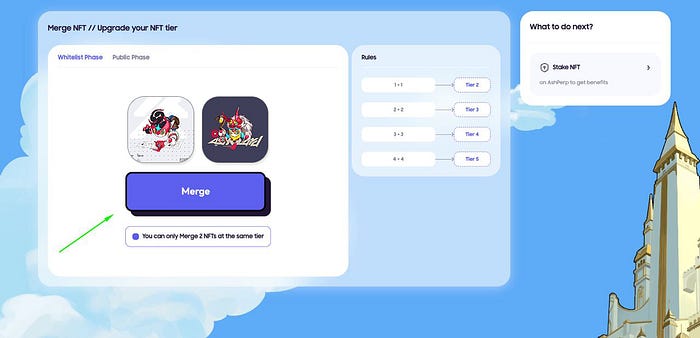
2. Navigate to the “Merge” section and select two NFTs of the same tier that you wish to merge.
3\. Press the “Merge” button to initiate the process. This will require you to have some $ASH tokens to cover the merging fees. For specific fee details, please refer to the above image.
Choose the NFTs you want to merge
Click the button and wait for your new AshGuard NFT
4\. Confirm the transaction through your wallet. Your new NFT will be delivered to your wallet shortly after the transaction is completed successfully.